Creative Assessment

Assessment is a vital part of the teaching and learning process. Unfortunately, it can be seen as a burden and one of the least enjoyable features of being an educator, yet when done well, it can be a very creative a rewarding experience for both teachers and learners.

This video blog post looks at a creative approach to diagnostic assessment or pre-assessment with the help of some Adobe tools. Diagnostic assessment is often overlooked in busy classrooms but when done well, it can help with engagement, curriculum planning as well as provide agency (a student voice) and lead to great levels of student engagement.

More information about using Adobe apps in education can be found within the Adobe Education Exchange which currently involved over 850,000 educators globally.

Some great Australian based tutorials for Premiere Rush, Spark Video and other Adobe apps are available via Dr Tim Kitchen’s EduTips series.

Click here if you would like to get monthly updates on Adobe in Education resources for busy teachers.


Adobe in Education APAC update – July, 2020

Adone_in_Edu_Banner2020

Podcast


As Semester 2 commences for many of you, have a think about how engagement and creativity can be enhanced in your classes by allowing the learners in your care to do assessment tasks via video with Premiere Rush or Spark Video or even Premiere Pro. You may also like to incorporate the amazing design thinking and collaboration capabilities of Adobe XD.

A new video course has recently been announced on the Adobe Education ExchangeMake Impactful Social Videos with your Students. This course helps teachers and students enrich their creative skillset and deepen their knowledge of video creation with Premiere Pro.

Another new course is the Adobe Spark Professional Learning Kit. This course is aimed at all educators working in primary, secondary or higher education looking to offer face to face or online professional development with Adobe Spark.


Inject Creativity Live – weekly free webinars

InjectCreativityLogo2020

At last week’s Inject Creativity Live Deeper-live event, the new Whiteboard plugin for XD was featured. It is a great tool for brainstorming and visual online collaboration. This week, the focus is on Adobe Spark. Join us each Wednesday evening starting at 6.30 PM (AEST), 4.30 PM – WA/SEA, 8.30 PM – NZ via any of these social media channels Facebook (closed group), YouTube or Twiter/Periscope.


New free PL series for K12 Teachers

K12Webinars2020

A new free series of professional learning events for K12 educators is happening online during Term 3. This will cover a number of Adobe applications that are available for many schools including Spark, Rush, Adobe Sign, Photoshop, Illustrator, Dimension, XD, Captivate & Presenter. Click here to find out more, share and register your interest.

events2020

The above events and more can be found in the new look Adobe in Education Events & Resources site.


APAC Adobe for Education Summit

Summit2019

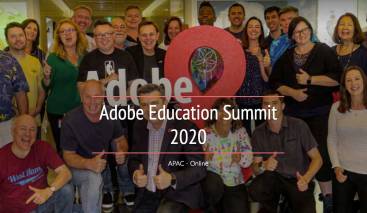
The 2020 APAC Adobe Education Summit will be held as an online event from September 29 to October 1. Being a holiday period for most educators in ANZ, this event is about digital creativity for all areas and levels of education. The theme will be Improving Education Following COVID-19. Please encourage your colleagues and wider education networks to register for the September 30 sessions that are open to all educators.


Adobe Creative Educators Program

ACEBanner2020

This month, Adobe is officially launching the Adobe Creative Educators program which is aimed to help teachers continue to develop their digital communication and creativity skills. Designed for educators in every subject area and sector, members will receive free lessons and resources to spark creativity with students, in addition to special events with other like-minded educators and the Adobe team. Encourage your colleagues to join.

The new Creativity for All course on the Adobe Education Exchange is a prerequisite for the Adobe Creative Educators Program, especially if you were not already an active member of the AEL or ACL program. This free course is about understanding the power of creativity, why it matters, and how to leverage it in your teaching helps prepare students with 21st Century skills they need to succeed.

Have a listen to Clara Galan (Adobe’s Global Education Community Lead: K-12 and Higher Education) chat about the new program that launches for APAC officially on July 14.


Australasian Adobe Education Community Facebook Group

Click here to join the Australasian Adobe Education Community Facebook Group and get first hand updates on the Adobe in Education program.

Don’t forget to join us live each Wednesday for Inject Creativity Live

Keep being creative!

Regards

Tim Kitchen (Senior Education Specialist, Adobe – APAC)

EduChat with Andrew On Yi Lai

This EduChat interview is with Andrew On Yi Lai, media teacher at Northern Beaches Secondary College – Freshwater Senior Campus in Sydney.

Podcast

Vodcast

Click here for more information about Andrew.

The charity mentioned by Andrew – hearforyou.com.au/
SkillShare for online learning – skillshare.com/
FreshMedia YouTube channel showcasing student, ex-student and teacher productions from Freshy – youtube.com/channel/UClsQ0UmGaznPpdTnt7PdUqg


Inject Creativity Live Event – July 8

We had a great Inject Creativity Live session last night with special guests Craig Daalmeijer-Power from NSW and Paul McClean from NZ.

Take note of Craig’s Adobe XD (Whiteboard Plugin) session. Great for design thinking!

Here is a recording of the Chat-show session

Click here for the Deeper-dive event

  • Chapter 1 – introductions
  • Chapter 2 – Craig Daalmeijer-Power  – Adobe XD (Whiteboard Plugin)
  • Chapter 3 – APAC Summit promo (http://bit.ly/adobe-edu-summit20)
  • Chapter 4 – Paul McClean – Future of Education research
  • Chapter 5 – Resources & takeaways

Join us live next week with guest presenter Dr Karen Sutherland – AEL from the University Of The Sunshine Coast

InjectCreativityLogo2020


Inject Creativity Live – July 8

Have a listen to the promotional podcast for this week’s Inject Creativity Live event,

Click here to find out more

InjectCreativityLogo2020

July 8

  • Focus – App design & development 
  • App – Adobe XD
  • Guest presenter – Craig Daalmeijer-Power  AEL/ACL & Lecturer / Head Teacher Nepean Arts & Design Centre- Tafe NSW Western Sydney

Craig18a

Special guest – Paul McClean CIO of Rare Innovations, NZ

Paul


EduChat with Rebecca Smith – NBCC

This interview is with Rebecca Smith, Visual Arts & Technology teacher at Northern Beaches Christian School in NSW.

Podcast

Vodcast

EduChat with Rebecca Smith from CreateEDU TV on Vimeo.

Rebecca is a regular presenter at Adobe in Education events in Sydney.

More information on Rebecca can be found via – https://edex.adobe.com/member/v10a9e8a5

Have a look her latest music video clip – https://www.youtube.com/watch?v=abVoK3j-cvI

Adobe in Education Update – June 2020

Podcast version of this newsletter


Adobe Education Exchange Update

We are very pleased to announce that the Adobe Education Exchange recently welcomed its 40,000th ANZ member. There are over 123,000 APAC members and globally we recently welcomed our 800,000th member. Thank you for sharing this resource with your colleagues and wider education networks.

New Self-Paced course

The Basic Principles of Design course is the most recent self-paced course on the Adobe Education Exchange. It is about helping teachers and students enrich their creative skillset and deepen their design knowledge.

New Three-Part Webinar Series for Aussie Schools
K12series2020

A new free three-part series of professional learning events for educators is happening online for K12 teachers in Term 3. This will cover a number of Adobe applications that are available for many schools including Spark, Rush, Adobe Sign, Photoshop, Illustrator, Dimension, XD, Captivate & Presenter. Find out more and register via – https://bit.ly/adobe-3part-2020a

Inject Creativity Live events

InjectCreativityLogo

Each Wednesday at 6.30 PM (AEST) the Inject Creativity Live Chat-show is available via YouTube, Twitter and Facebook then at 7.00 PM (AEST) we jump into the Deeper-dive event via BlueJeans. No need to register unless you would like a reminder email and a copy of the recordings. Click here for more information.

New Creative Cloud Products & Features

In response to the recent turmoil around the globe, Adobe hacreative_cloud_blog3ve just launched dozens of new tools and features in apps like Photoshop, Lightroom, and XD to help people learn, collaborate, and create more effectively. Click here for Scott Belsky’s recent blog post that explains more.

Adobe Creative Educators Program

At the end of this month, Adobe will be launching the Adobe Creative Educators program which is aimed to help teachace1ers continue to develop their digital communication and creativity skills. Designed for educators in every subject area and sector, members will receive free lessons and resources to spark creativity with students, in addition to special events with other like-minded educators and the Adobe team.

Adobe Education Summit

The 2020 APAC Adobe Education Summit will be held as an online event Summit1from September 29 to October 1. Being a holiday period for most educators in ANZ, this event is about digital creativity for all areas and levels of education. The theme will be Improving Education Following COVID-19. Please encourage your colleagues and wider education networks to register for the September 30 sessions.

Australasian Adobe Education Community Facebook Group

Click here to join the Australasian Adobe Education Community Facebook Group and get first hand updates on the Adobe in Education program.

Don’t forget to join us live each Wednesday via http://bit.ly/adobe-inject.

Keep being creative!

Regards

Tim Kitchen (Senior Education Specialist, Adobe – APAC)


1 Minute Video Challenge – Haileybury

1minVidChal

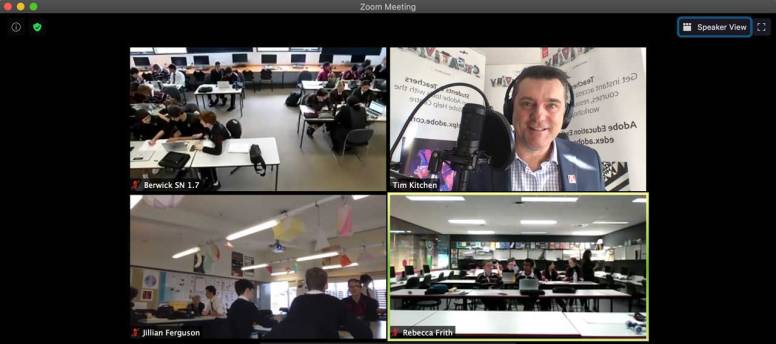
Over 50 Year 9 media students from three different campuses (Berwick, City & Bentleigh) at Haileybury College in Melbourne took part in a special all-day virtual version of the Adobe 1 Minute Video Challenge.
Haileybury-planning1

The challenge was to work with a group, choose one of the 17 United Nations Sustainable Development Goals and promote it with a 1 minute video story using Adobe Premiere Rush.

SDG1

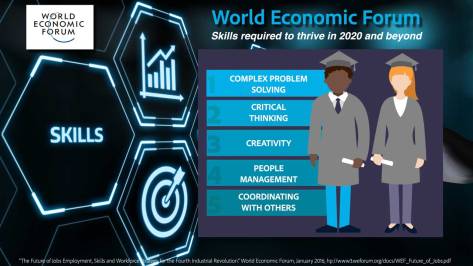
The aim of this Challenge was to help the students enhance their video literacy, communication, collaboration, critical thinking, problem solving and creativity skills. All recognised internationally as vital to thrive in the future.
skills1

We began the day by going through the top five skills required to thrive in the future according to the World Economic Forum and relating them to what the student were about to do.

Then we went through the 17 United Nations Sustainable Development Goals and encouraged the students to establish their production groups and decide which one of the goals they would focus on.

SDG2

Then we ran a short Adobe Premiere Rush workshop.
Rush1

The criteria for each of the video stories featured the following…

  • Students need to work with a group (teachers can be included);
  • The completed video needs to be G rated;
  • All images & audio need to be either original or royalty free and appropriately credited;
  • All students who could be identified in the video need to have an Adobe release form signed by a parent or guardian;
  • Each video needs to have an opening title and closing credits (please only include first names in the credits)
  • Originality – the uniqueness and originality of the story.
  • Creativity – the effective use of imagination and creative thinking.
  • Story structure – effective beginning, middle & end.
  • Pacing – use of the 7 second rule
  • Framing – screen filled and lack of headroom,
  • Sound quality – effective use of the microphone
  • Music score – is the sound track suited to the clip and does it help tell the story
  • Informative – are the facts well researched
  • Message Effectiveness – is the story well communicated
  • Call to Action – does the clip create a desire in the viewer to make a change

The students then went through a pre-production planning stage where they brainstormed, scripted & story-boarded there way through a plan of their video story.


Then they has time to film and gather all their original and royalty free images and audio files for their story.


The deadline was 2PM to have have the stories editing and exported in preparation for the Showcase and judging at 2.30 PM.

There were 13 video stories created and the overall quality was very good, especially considering most of the students were new to video production and Premiere Rush. The groups that spent the most time planning produced the best results.

Each film went through a peer judging process and the winning films won chocolate and Adobe merchandise prizes.

Congratulations to

1st Place – Brighton Group 3 (474 pts) Zach, Clancy & Isaac
2nd Place – Berwick Group 5 (458 pts) Ruihan, Daniyal, Aaranan & Vlnith
3rd Place – City Group 3 (438 pts) Hongzheng, Aston & Kat

Here are samples of some of the student’s work …

Error
This video doesn’t exist
Error
This video doesn’t exist
Error
This video doesn’t exist
Error
This video doesn’t exist

Thank you to Mr Sam Lucas (Head of Haileybury Art) for organising this event.

Feedback from the teachers involved …

Running our first Cross Campus Zoom event was a really exciting and successful experiment. It meant that the students could engage and experience contact with an industry professional without leaving the campus. Great work.

Thanks, Tim for a really successful session. You presented concrete and relevant examples of how these tools will be used in a future workforce. Something that is consistently needed within creative arts studies with young people.

The event was well structured and allowed for students to experience a good amount of theoretical knowledge whilst remaining engaged. The idea to view and judge at the end was a great way to have the students reflect on their knowledge and techniques. It was well managed and enjoyable for the students.

This actually worked really well in the online learning forum, having the students able to interact and engage with other campuses was unique. I could imagine this would be really beneficial if we could do this with other schools or interstate, even internationally!

A highlight was the structure and resources for the day also the skill level of Dr Kitchen as a presenter

My highlight was seeing the kids having fun making films. As they ventured outside of the classroom, each group found a quiet spot to capture footage for their short film. Everyone got involved and enjoyed the process of creating films using Adobe Rush.

It was an enjoyable day. Thank you.